
From 15 September everyone in Mo.one has one identity: their personal account. The roles of merchant, hunter or employee are added to it and switched with a single tap. Here is what changes, who it affects and what to do after your first sign-in.
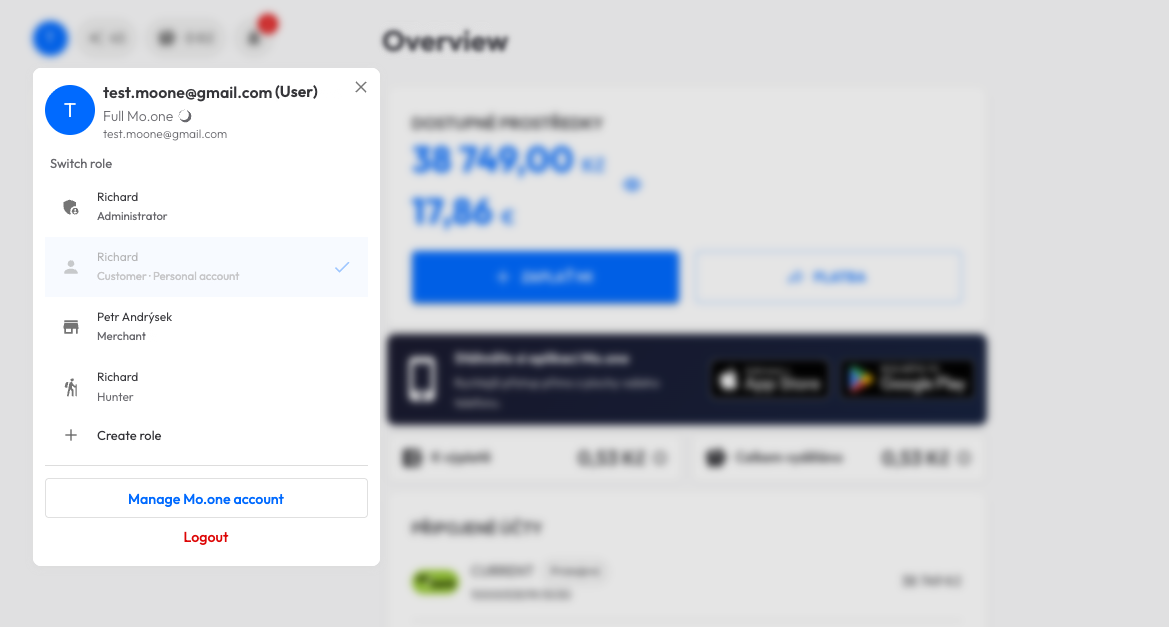
Until now a merchant, a hunter and a customer each had a separate account with its own sign-in. From now on the personal account is the base and roles are part of it.
Your sign-in, identity verification and bank accounts all belong to one identity. You sign in with one e-mail and password no matter which role you are working in.
Merchant, hunter, employee. Each role has its own overview, transactions and settings. You switch it by tapping the profile circle at the top left, without signing out.
Do you want to take payments in your business or register merchants as a hunter alongside your personal account? You add the role right in the app with a short guide.
Do you only have a personal account and pay with Mo.one? The change happens automatically. You sign in as before and everything stays where it is.
At your first sign-in after 15 September the app will ask you to link with your personal account. It takes a minute. After that you send access to your staff again.
Step by stepThe same step as for a merchant. After linking, check your referral link in the app, it may change.
Step by stepExisting employee sign-ins end on 15 September. You set up a personal account and the merchant sends you access again in the app.
What to doYou sign in with the same e-mail and password as before. Before the app lets you through, you link your merchant or hunter account with your personal account. The steps cannot be skipped, but nothing can go wrong either.
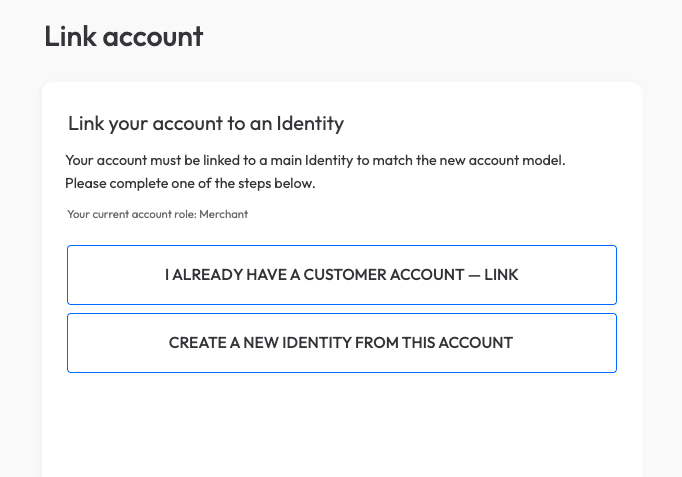
After signing in you will see the Link account screen. It offers two paths and it only depends on whether you already have a personal account in Mo.one.
In the app the personal account is still called „Customer account“. It is the same thing.
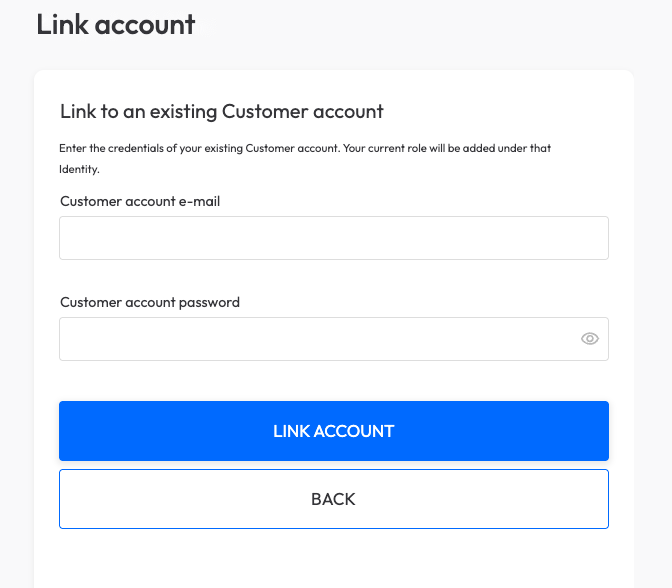
You fill in the e-mail and password of your personal account and confirm. Your merchant or hunter role is added to it with everything that belongs to it: transactions, locations, settlement statements, licence.
From that moment you sign in with the e-mail of your personal account. The original merchant or hunter sign-in stops working and the app will remind you of that when you try it.
One tap creates the personal account and your role is added to it. The e-mail and password stay the same.
Tap the profile circle at the top left. You will see all your roles and switch between them with a single tap. The personal account, the merchant and the hunter each have their own overview and transactions.
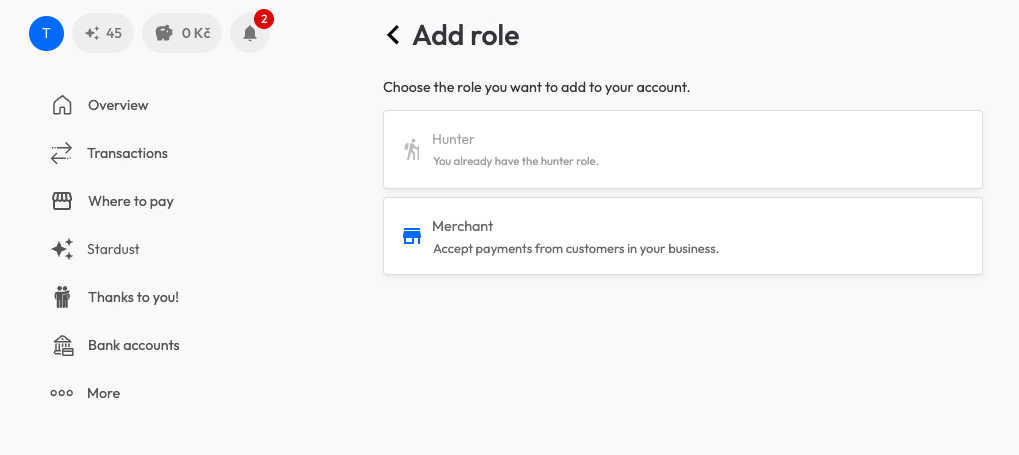
The Create role button adds another one, for example a hunter role alongside a merchant account.
Employee sign-ins used to be separate accounts. From now on an employee is a person with their own personal account, to whom the merchant adds a role. That is why existing employee sign-ins end on the morning of 15 September and need to be renewed.
If the employee has no personal account in Mo.one, they set one up at app.mo.one as an ordinary customer. An e-mail and a password are enough.
Once you have linked your own account, open Employees. For each person check that the e-mail matches their personal account and tap Send access. Employee records stay, they only wait for new access.
The invitation arrives right in the app under their personal account. Once they accept it, the employee role appears in their profile and they can take payments as before.
We recommend merchants with staff do these steps on the morning of 15 September, so their staff can take payments without a break.
A customer who starts a business, or a merchant who wants to register other merchants as a hunter, no longer sets up a new account. In the profile they tap Create role, choose Hunter or Merchant and go through a short guide. They do not fill in again what Mo.one already knows.
A verified personal account is the condition. If you have not been through identity verification yet, the app will guide you through it first.
Referral links from hunters and merchants keep working. A new person sets up a personal account through them and adds a role right after.
From 15 September the app is ready to work in more countries and currencies. Czechia stays as it is, Slovakia is in preparation. One identity also means the same sign-in can follow you in Mo.one Hub, at a hunter and in everything that comes next. What we are planning is openly in our plan.
Write to us right from the app through Report a problem, or let us know by e-mail or phone. In the days after the change we answer with priority.