
From sign-up to your first payment in seven minutes.
You sign up, link your bank account and connect a PayPoint. Staff raise payments from their own phones, your accountant gets statements and you keep taking cards. Here is the whole operation step by step.
The money is in your account, not in settlement.
A direct payment goes from the customer's account to yours within three seconds. Not in three days, not at the end of the month. You work with the money the same day: pay a supplier, restock, pay out a shift.
Mo.one never touches the money. We only pass the instruction to the customer's bank about who to pay and how much. The transfer goes from their account to yours and we stand nowhere in between.
And it costs 0.49 % of the payment for the first 1 000 business owners, after that always 0.78 % at most. The fee is not deducted from individual payments: at the end of the month you get a settlement statement and pay the invoice right in the app. How much that is for you is worked out by the calculator.
Three steps. Seven minutes.
Sign-up in Mo.one
Online, from a phone or a computer. Your business ID fills in the details from the register, you add a contact.
Linking a bank account
You choose the bank and the account the payments should go to. You sign in at your own bank and copy nothing.
Connecting the PayPoint
You assign the tag to the account in the app and put it on the counter. From that moment you take payments.
Staff raise payments. They never reach your account.
You give nobody view rights to your account. You invite an employee in the app, they install it on their own phone, raise payments and see their status. They do not see the balance, the statements or the settings.
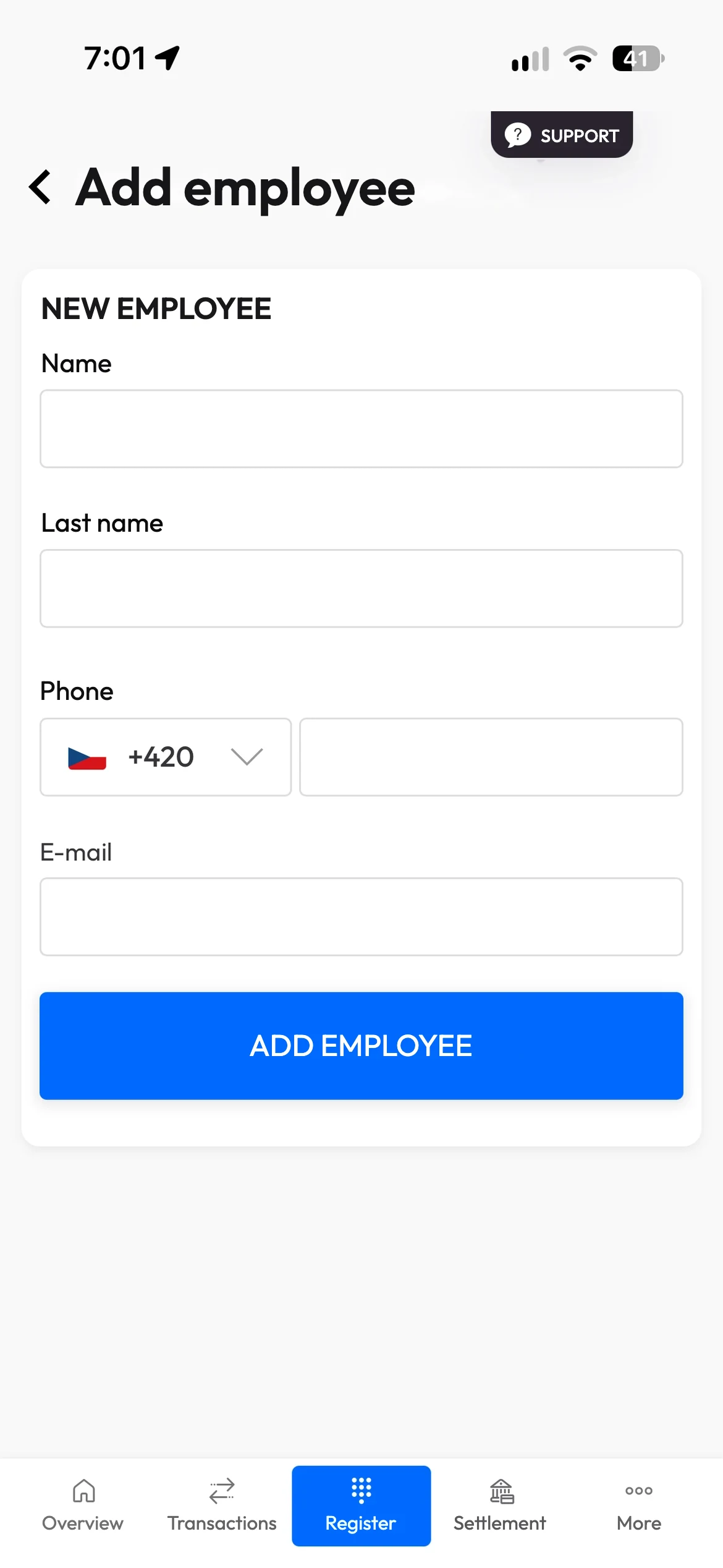
You: invite an employeeName, phone, e-mail. Their access arrives by e-mail.
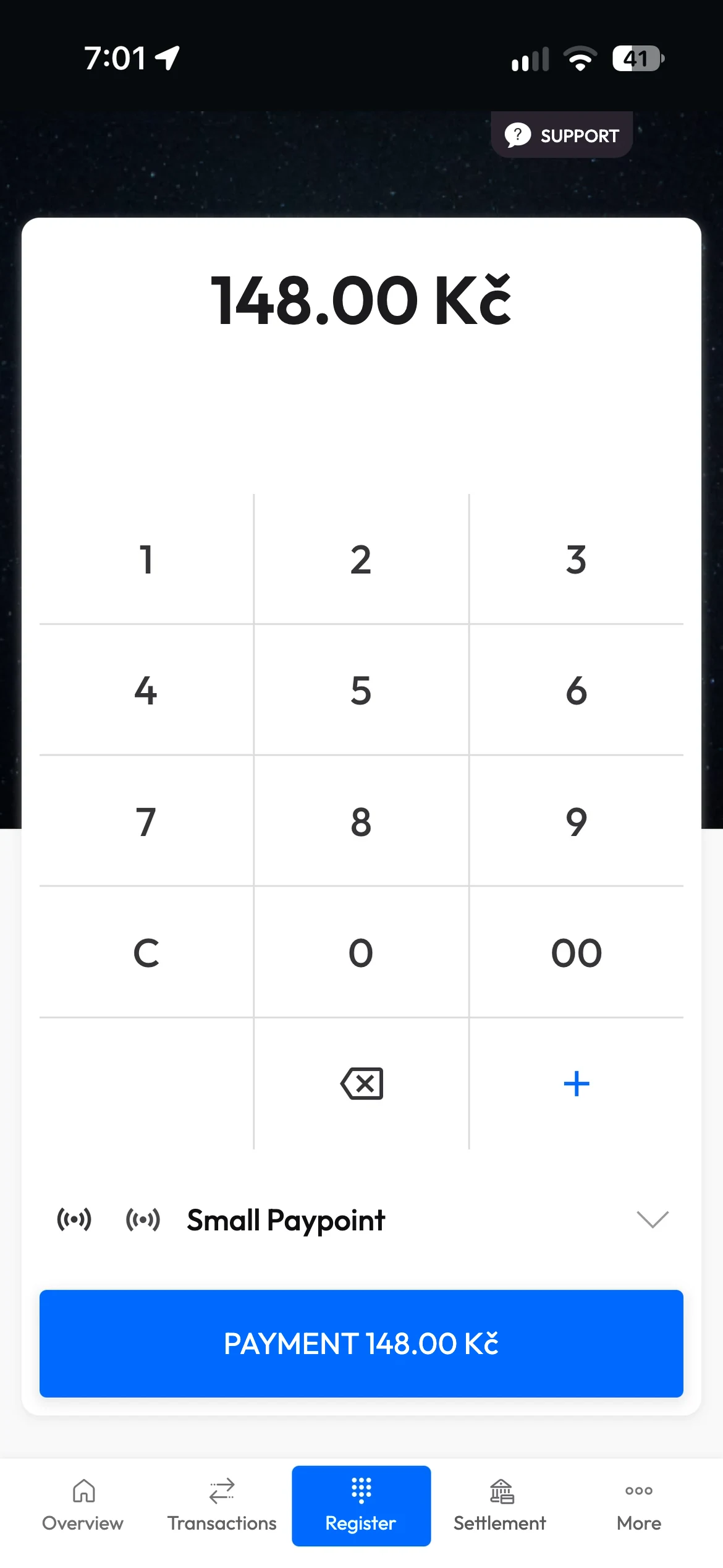
Employee: raises a paymentIn the till they enter the amount, pick a PayPoint and the customer holds up their phone.
Employee: sees the paymentThe amount, the fee and the status. Not the balance or the statements.
Hundreds of payments a day. One entry.
Every direct payment is a separate transfer from the customer's account. You do not have to post them one by one though.
- In batches. You post all direct payments for a day as one summary entry (Dr 221 / Cr 604) and attach the daily transaction overview from the app.
- A separate account. We recommend taking direct payments to a separate bank account and keeping your own analytical account, for example 221.02. That keeps the payments apart from your other movements.
- Documents. A transaction statement in the app with the payer, the amount and the variable symbol, and a PDF statement for a chosen period. An API connection is in preparation.
- The fee. It is not deducted from payments. It comes once a month as a separate invoice from Mo.one a.s., you pay it in the app and it is posted as a service (518), with VAT deduction for VAT payers.
The whole procedure for accountants: How to account for direct payments received through the Mo.one app (PDF).
Cards stay. From everyone you teach to pay with Mo.one, you get a share.
We know you have to teach customers to pay differently, and that there is not always room for it at the counter. That is why the card stays with you as well. And we turned that disadvantage into an advantage.
A share of your customers' payments
Anyone who pays with Mo.one at your place and signs up within 72 hours is credited to you. From every further direct payment they make at any merchant you get a share, month after month. It is paid out from 100 Kč, always the following month. The share follows the order of sign-up and then stays with them.
The Díky Tobě programme, terms in the app under Documents. More about Díky Tobě
The first payment works even without signing up
- The customer holds their phone to the PayPoint and opens the link.
- They choose their bank and approve the connection in it.
- They come back, tap Pay and confirm the payment in the bank.
That is it for the first time. Every further payment is just a confirmation in the bank. If they sign up after that first payment, you have them in your Díky Tobě programme.
Orders at the table, messages to customers, rewards. All in the Mo.one Hub till.
Ordering from the table
The guest orders and pays at the table from their phone, the kitchen sees the order right away.
Messages to customers
„Your birthday is in a week, come for a coffee and get a discount." You reach the people who have already paid with you, right in the app. Coming soon.
Mo.one on us
The customer knows that paying with Mo.one gives them a chance of a free purchase or a discount. You choose how much you put into it each month. Coming soon.
Your story on national television.
An eleven-minute report on the Prima ROK show, premiere and repeat, an article and a video that stays yours. The whole package with Mo.one for 99 990 Kč.
In seven minutes you are taking payments.
Sign-up is online and you put the PayPoint on the counter yourself. If you are unsure, we will go through it with you, no strings attached.
Or a consultation, no strings attached with someone from Mo.one.